
Open Source Models
MoE vs. Dense Local LLMs on Apple Silicon: Memory & Speed
Compare Mixture-of-Experts (MoE) and dense local LLMs on Apple Silicon. See how total vs. active parameters affect RAM, prefill, and token speed.
What to try
- During single-user token generation, an MoE model streams only its active parameters (e.g., 1.5B–3.3B) across the Unified Memory bus, generating 3x–6x faster than a dense model of equal total size.
- Every routed expert must remain resident in RAM because token routing changes dynamically at every layer; a 30.5B-A3B 4-bit MoE model still requires ~16.0 GiB of weights in Unified Memory.
- Long-prompt prefill activates nearly all experts across a batch of tokens (1 - (1 - k/E)^N), reducing the MoE memory-bandwidth advantage during initial document ingestion.
- Hybrid MoE architectures like Liquid LFM2.5-8B-A1B and LFM2.5-24B-A2B pair sparse top-4 expert routing with gated short-convolution layers, cutting both per-token weight reads and KV cache memory.
When you run a local LLM on a Mac, iPad, or iPhone, a sparse Mixture-of-Experts (MoE) model such as Qwen3-Coder-30B-A3B or LFM2.5-24B-A2B gives you the knowledge capacity of a 24B–30B checkpoint at the token generation speed of a 2B–3B model—provided all of its weights fit inside Unified Memory without paging to SSD. On tight memory budgets (such as an 8 GB iPhone or a 16 GB Mac running large contexts), a smaller dense model or a compact hybrid MoE like LFM2.5-8B-A1B avoids swap and delivers more predictable latency.
1. Why active parameters set token speed while total parameters set RAM
In a standard dense transformer—such as mlx-community/Qwen3-8B-6bit (8.19B parameters) or mlx-community/Ministral-3-14B-Instruct-2512-4bit (13.95B parameters)—every single feed-forward network (FFN) parameter participates in computing every generated token. Because autoregressive decoding at batch_size = 1 performs General Matrix-Vector (GEMV) multiplications with low arithmetic intensity, token throughput is governed almost entirely by how fast the SoC can stream active weights from Unified Memory:
Theoretical Max Decode Throughput (tok/s) ≈ Usable Memory Bandwidth (GB/s) ÷ Active Weight Bytes Read per Token (GB)As introduced in the Mixtral of Experts paper and expanded with fine-grained routing in the Qwen3 Technical Report, a sparse Mixture-of-Experts layer replaces the single dense FFN block with an array of E smaller expert sub-networks and a lightweight linear router (the gate). For each token at each layer, the router computes a probability distribution over all E experts and activates only the top k experts:
- Decode bandwidth scales with
k / E(active parameters): Inmlx-community/Qwen3-Coder-30B-A3B-Instruct-4bit, each of the 48 layers containsnum_experts: 128routed experts, but the router selects onlynum_experts_per_tok: 8per token. Out of 30.53B total parameters (16.00 GiB on disk/RAM), only 3.3B parameters (~1.75 GiB of 4-bit weights) are streamed across the memory bus per generated token—roughly 4.5× less memory traffic per token than a dense 14B model (7.85 GiB). - RAM capacity scales with total parameters: Because the router chooses different experts from one token to the next—for example, activating Python syntax specialists on token t and SQL schema specialists on token t + 1—every expert shard must remain mapped in DRAM. In native Apple Silicon runtimes such as MLX Swift LM, a 30.5B MoE model still claims 16.00 GiB of Unified Memory before counting the KV cache.
- Why router gates stay at higher precision: Inspecting the
config.jsonof 4-bit MLX MoE exports reveals that while expert MLPs use 4-bit affine quantization (group_size: 64), the router gate tensors (mlp.gateorfeed_forward.gate) are preserved at 8-bit or unquantized FP32. Keeping those small routing matrices at higher precision prevents quantization noise from flipping top-k expert selection.
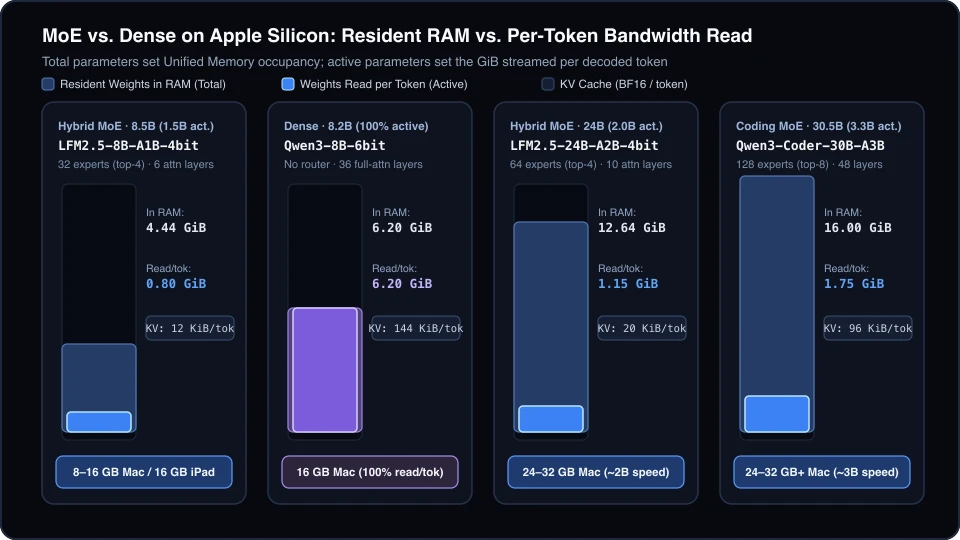
LFM2.5-8B-A1B-4bit, Qwen3-8B-6bit, LFM2.5-24B-A2B-4bit, and Qwen3-Coder-30B-A3B-4bit.To see how the DRAM bus limits autoregressive generation across M-series and A-series chips, read the guide to Apple Silicon memory bandwidth for LLMs.
2. The prefill asymmetry: why long prompts activate nearly every expert
A common surprise when benchmarking MoE models locally is that while token-by-token generation feels as fast as a 2B–3B model, pasting a 4,000-token file produces a noticeably longer pause before the first token (Time to First Token, or TTFT) than a true 3B dense model. The reason lies in how batch token routing behaves during prompt prefill.
During prefill, the engine evaluates N prompt tokens in parallel. If each token selects k out of E experts approximately uniformly across a varied text or code prompt, the probability that any single expert is selected by at least one token in a batch of size N follows:
Expected Fraction of Active Experts in Batch(N) ≈ 1 − (1 − k / E)^N- At
N = 1(autoregressive decoding): InQwen3-Coder-30B-A3B(E = 128,k = 8), exactly8 / 128 = 6.25%of expert weights are read from Unified Memory. - At
N = 16tokens: Already1 − (1 − 8/128)^16 ≈ 64.4%of all experts in each layer are touched by at least one token in the chunk. - At
N = 64or512tokens (typical prefill block size): Over 98.4% to 100% of all 128 experts are activated within a single prefill block.
During prefill, MoE still saves compute FLOPs—each individual token vector is multiplied only against its 8 assigned experts rather than all 128, so matrix-multiply FLOPs scale with the 3.3B active parameter count rather than 30.5B. However, the GPU must still load nearly the entire 16.00 GiB checkpoint into its caches per prefill pass and execute gather/scatter routing overhead. And if your Mac does not have enough free RAM to hold all 16.00 GiB inside Metal's working set, touching nearly 100% of experts during prefill triggers immediate SSD swap thrashing.
If you work with long documents and want to avoid recomputing prefill on every turn, see how prompt caching for local LLMs on Apple Silicon works.
3. Hybrid MoE vs. standard Transformer MoE: cutting KV cache and attention cost
Even when an MoE model reduces feed-forward weight reads, a standard Transformer MoE still runs full self-attention on every layer. That means quadratic prefill attention scaling and a growing Key-Value (KV) cache across all layers. Newer hybrid MoE architectures solve both bottlenecks simultaneously by combining sparse expert routing with gated short-convolution layers.
Compare the published config.json specifications of Liquid AI's hybrid MoE models—mlx-community/LFM2.5-8B-A1B-MLX-4bit and LiquidAI/LFM2.5-24B-A2B-MLX-4bit—against standard full-attention models:
LFM2.5-8B-A1B-MLX-4bit(8.47B total, ~1.5B active): Acrossnum_hidden_layers: 24(2 initial dense layers + 22 MoE layers withnum_experts: 32andnum_experts_per_tok: 4), itslayer_typesarray defines only 6full_attentionlayers interleaved with 18conv(short-convolution,conv_L_cache: 3) layers. Because the 18 convolution layers maintain a tiny fixed-size state instead of a per-token KV cache, its uncompressed BF16 KV cache is just 12 KiB per token (2 × 6 × 8 × 64 × 2 bytes)—12× smaller thanQwen3-8B-6bit(144 KiB/token).LFM2.5-24B-A2B-MLX-4bit(23.97B total, ~2.0B active): Acrossnum_hidden_layers: 40(2 dense + 38 MoE layers withnum_experts: 64andnum_experts_per_tok: 4), only 10 layers usefull_attentionwhile 30 use bounded short convolutions. Its BF16 KV cache costs only 20 KiB per token (640 MiB at 32,768 tokens, compared to 3.00 GiB forQwen3-Coder-30B-A3Band 4.50 GiB forQwen3-8B-6bit).
For models that use full attention across all layers, you can compress context memory further with KV cache quantization on Apple Silicon.
4. Six real MLX checkpoints compared across 8 GB, 16 GB, and 32 GB+ tiers
Use the table below—computed directly from each repository's config.json and .safetensors shard manifests—to match a dense or MoE checkpoint to your Apple Silicon hardware:
| Model (MLX Checkpoint) | Architecture & Routing | Total vs. Active Params | Resident Weights (RAM) | Active Read / Token | BF16 KV / Token (32K Total) | Recommended Apple Tier |
|---|---|---|---|---|---|---|
LFM2.5-8B-A1B-MLX-4bit |
Hybrid MoE (6 attn + 18 conv · top-4/32) | 8.47B total · 1.5B active | 4.44 GiB (4,544 MiB) | ~0.80 GiB | 12 KiB (0.38 GiB) | 16 GB Mac / 16 GB iPad (tight on 8 GB Mac) |
Qwen3-8B-6bit |
Dense Transformer (36 attn layers) | 8.19B total · 8.19B active | 6.20 GiB (6,347 MiB) | 6.20 GiB | 144 KiB (4.50 GiB) | 16 GB+ Mac (4K–16K ctx) |
Ministral-3-14B-2512-4bit |
Dense VLM Transformer (40 attn layers) | 13.95B total · 13.95B active | 7.85 GiB (8,034 MiB) | 7.85 GiB | 160 KiB (5.00 GiB) | 16 GB Mac (short ctx) / 24 GB+ Mac |
LFM2.5-24B-A2B-MLX-4bit |
Hybrid MoE (10 attn + 30 conv · top-4/64) | 23.97B total · 2.0B active | 12.64 GiB (12,939 MiB) | ~1.15 GiB | 20 KiB (0.63 GiB) | 24 GB Mac (Heavy) / 32 GB+ Mac |
Qwen3.8-27B-4bit |
Dense VLM Transformer | 27.78B total · 27.78B active | ~14.98 GiB (15,337 MiB) | ~14.98 GiB | High (full attn) | 32 GB+ Mac (prioritizes depth over speed) |
Qwen3-Coder-30B-A3B-4bit |
Transformer MoE (48 attn · top-8/128) | 30.53B total · 3.3B active | 16.00 GiB (16,385 MiB) | ~1.75 GiB | 96 KiB (3.00 GiB) | 24 GB Mac (short ctx) / 32 GB+ Mac |
- On 6 GB–8 GB iPhones and 8 GB iPads: Because iOS enforces a strict zero-swap jetsam limit (~2.8–3.3 GiB usable), multi-gigabyte 8B–30B MoE checkpoints exceed device memory. Stick to compact dense or hybrid models in the 0.5B–4B range (such as
LFM2.5-1.2B-Instruct-4bitorQwen3.5-2B-4bit) for on-device execution. - On a 16 GB Mac or 16 GB iPad:
LFM2.5-8B-A1B-MLX-4bit(4.44 GiB weights, 0.80 GiB read per token, 12 KiB/token KV) gives you an 8.5B parameter pool while streaming fewer bytes per token than a 2B dense model. By contrast, a dense 14B model (Ministral-3-14B-4bit, 7.85 GiB) fits in 16 GB for multimodal and general tasks, but generates at roughly one-fifth to one-eighth the token rate. - On a 24 GB or 32 GB+ Mac: This is where large MoE models shine. Both
LFM2.5-24B-A2B-MLX-4bit(12.64 GiB weights) andQwen3-Coder-30B-A3B-Instruct-4bit(16.00 GiB weights) fit inside Unified Memory while streaming just 1.15–1.75 GiB per decoded token—delivering 24B–30B coding and reasoning quality at interactive 2B–3B speeds.
To combine weights, KV cache, and OS headroom for your exact device tier, check our guide on how much RAM a local LLM needs on Mac, iPhone, and iPad.
To see how llama.cpp v1.0.0 adds host-memory MoE expert caching alongside other local updates, read our November 9–15 AI weekly roundup.
5. How to benchmark MoE vs. dense models on your own Mac or iPad
Because real throughput depends on your chip's memory bus (e.g., 120–153 GB/s on base M3/M4 vs. 273–546 GB/s on Pro/Max), background apps, and thermal state, run this four-step check on your own hardware to see whether an MoE or dense model serves your workflow better:
- Pick one dense and one MoE checkpoint that both fit without swap: On a 16 GB Mac, compare
LFM2.5-8B-A1B-MLX-4bitagainstQwen3-8B-6bit. On a 32 GB+ Mac, compareQwen3-Coder-30B-A3B-Instruct-4bit(orLFM2.5-24B-A2B-MLX-4bit) againstQwen3.8-27B-4bit. - Test 1 — Short-prompt decode throughput (100-token input, 400-token reply): Ask both models to write a self-contained Swift function or structured explanation with the same output token limit. Record tokens per second after the first word appears. This isolates the
k / Ememory-bandwidth advantage of MoE during single-token decoding. - Test 2 — Long-prompt prefill latency (4,000-token input): Paste a 3,000-word technical document or source file and measure Time to First Token (TTFT) alongside Activity Monitor's Memory Pressure and Swap Used. Notice how a Transformer MoE takes longer to prefill than a small 3B model, whereas a hybrid MoE (
LFM2.5) keeps KV cache allocation minimal. - Test 3 — Task verification: Run the generated code or verify three specific facts against your source document. Keep the model that produces fewer factual or syntax errors within your interactive latency budget.
To follow local MoE updates like Inkling 2 Mini and SSD expert streaming on a 32 GB Mac, read our November 16–22 AI weekly roundup.
6. How to apply this in Lapis
You can put these architectural trade-offs into practice directly inside Lapis across iPhone, iPad, and Mac:
- Compare total vs. active parameters in the model catalog: Lapis's device-aware model catalog includes both dense checkpoints (such as
Qwen3-8B-6bit,Ministral-3-14B-Instruct-2512-4bit, andQwen3.8-27B-4bit) and sparse/hybrid MoE models (includingLFM2.5-8B-A1B-MLX-4bit,LFM2.5-24B-A2B-MLX-4bit, andQwen3-Coder-30B-A3B-Instruct-4bit). Each card surfaces total download size, active parameters, and memory guidance based on your device's actual Unified Memory budget rather than treating a "2B active" MoE as a 2B download. - Keep long sessions within safe memory bounds: When you test dense or MoE models on longer documents, Lapis's memory-aware context management reserves space for the reply and prioritizes recent turns before the KV cache can push your device into macOS swap or iOS jetsam termination.
- Use 24B–30B MoE models from your iPhone with Lapis Link: Since 13–16 GiB MoE checkpoints cannot reside in an 8 GB iPhone's RAM, you can pair your iPhone or iPad with an awake Mac using Lapis Link over your local network or Tailscale. Your Mac holds all 64 or 128 experts in Unified Memory and streams encrypted text responses back at MoE decode speeds.
Explore the dense and MoE variants supported on your device in the Lapis model catalog.
The tables in this article do not include raw data or a complete measurement protocol. Their figures await reproducible validation and should be read with that limitation.
Sources and references
- Mixtral of Experts
Albert Q. Jiang, Alexandre Sablayrolles, Antoine Roux, Arthur Mensch, et al. (Mistral AI / arXiv:2401.04088)
- Qwen3 Technical Report
Qwen Team, Alibaba Group (arXiv:2505.09388)
- LFM2.5-8B-A1B-MLX-4bit Model Card and Configuration (config.json)
Liquid AI & MLX Community (Hugging Face)
- LFM2.5-24B-A2B-MLX-4bit Official Model Card and Configuration (config.json)
Liquid AI (Hugging Face)
- Qwen3-Coder-30B-A3B-Instruct-4bit Mixture-of-Experts Specification (config.json)
Qwen Team & MLX Community (Hugging Face)
- Qwen3-8B-6bit Model Card and Quantization Specification (config.json)
Qwen Team & MLX Community (Hugging Face)
- Ministral-3-14B-Instruct-2512-4bit Model Card and Configuration (config.json)
Mistral AI & MLX Community (Hugging Face)
- MLX Swift LM: Language and Vision-Language Models on Apple Silicon
Apple Machine Learning Research (GitHub: ml-explore/mlx-swift-lm)
Local execution with Lapis
Chat with compatible models on iPhone, iPad and Mac. Download them once and use local inference offline; model size depends on your device’s resources.