
Vision & Multimodal
How Local Video Analysis Works with Vision-Language Models on Apple Silicon
Learn how local VLMs convert video into visual tokens on Mac, iPad, and iPhone—why resolution and FPS control RAM, and why audio is not included.
What to try
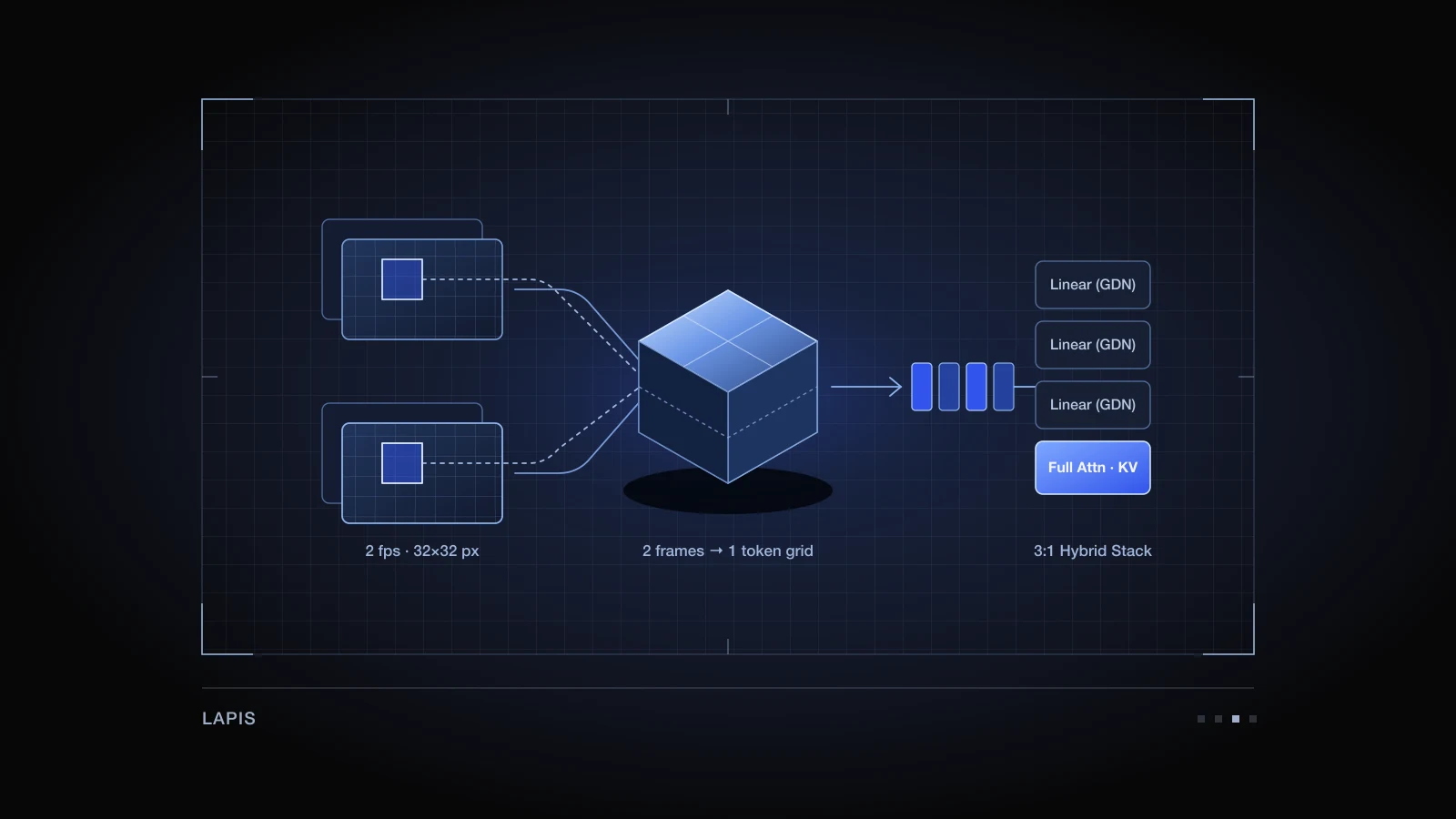
- Local vision-language models such as Qwen3.5 do not ingest raw 30 or 60 fps streams: they sample frames, pair every two frames (temporal_patch_size: 2), and merge 32 × 32 pixel blocks into each visual token.
- Capping a 30-second clip at 2 fps and 768 px on the longest side produces about 10,080 visual tokens, compared to 61,200 tokens at uncapped 1080p.
- Qwen3.5’s 3:1 hybrid attention stack holds BF16 KV cache for that 30-second clip to 118–315 MiB, under half the 665 MiB required by full-attention Qwen2.5-VL-7B at similar frame sizes.
- Visual frame sampling does not hear audio tracks: spoken dialogue without on-screen captions is invisible unless paired with separate local speech transcription.
A local vision-language model does not watch a video stream at 30 or 60 frames per second. Instead, native Apple Silicon runtimes decode a sampled sequence of still frames, resize them below a pixel ceiling, group adjacent frames and pixel patches into spatiotemporal visual tokens, and feed those tokens into the language model’s context window alongside your prompt. Understanding that conversion explains why a 30-second clip fits comfortably on an iPhone or Mac when capped at 2 fps and 768 px—and why sending raw 1080p frames or assuming the model hears audio fails immediately.
1. From movie file to visual tokens: sampling, patching, and merging
When you attach an MP4 or MOV clip to an open-weights multimodal model such as Qwen3.5 or Qwen2.5-VL, two separate stages happen before the first output word appears:
- Temporal frame sampling (
fps): A platform media decoder extracts evenly spaced frames—for example, 1 or 2 frames per second—rather than every decoded frame. At 2 fps, a 30-second clip yields 60 frames with timestamps attached so the model tracks order and elapsed time. - 3D spatiotemporal patching (
patch_size,temporal_patch_size,spatial_merge_size): Inspecting the publishedconfig.jsonandvideo_preprocessor_config.jsonfiles for Qwen3.5-4B showspatch_size: 16,temporal_patch_size: 2, andspatial_merge_size: 2. The vision encoder groups two consecutive frames and merges every 2 × 2 grid of 16 × 16 patches into one visual token representing a 32 × 32 pixel block across two frames. - Multidimensional position encoding (M-RoPE): The processor records a
video_grid_thwtuple—Temporal (T), Height (H), and Width (W)—so rotary position embeddings separate time progression from horizontal and vertical layout inside each frame.
That 32 × 32 pixel unit is why resolution dominates your context budget:
Visual Tokens ≈ (Frames ÷ temporal_patch_size) × (Aligned Width ÷ (patch_size × spatial_merge_size)) × (Aligned Height ÷ (patch_size × spatial_merge_size))For a 16:9 clip scaled to 768 px on its longest edge and aligned to multiples of 32 (768 × 448 px), each pair of frames costs 24 × 14 = 336 visual tokens. Across 30 seconds at 2 fps (60 frames, or 30 temporal pairs), the video consumes 10,080 visual tokens before your text prompt. Leave the exact same 30-second clip at uncapped 1080p (aligned to 1920 × 1088 px) and each pair jumps to 60 × 34 = 2,040 tokens—61,200 visual tokens in total.
If you want to start with still images before moving to video clips, read how to run a vision-language model locally.
2. Why video spikes memory: ViT prefill buffers vs. hybrid KV cache
On Apple Silicon, Unified Memory is shared by the CPU, Metal GPU, and system processes, which means a local video query hits two distinct memory pressures beyond the downloaded model weights:
- Vision encoder (ViT) activation spikes during prefill: Before the language backbone generates a single word, the vision tower runs self-attention over the extracted patches. Unclamped frame counts or 1080p inputs inflate intermediate attention buffers inside the ViT, stalling Time to First Token (TTFT) and risking memory pressure on 8 GB iPhones or 16 GB Macs.
- Context KV cache during decoding: Once visual tokens enter the language model, every full self-attention layer stores Key and Value tensors for those 10,080+ tokens. This is where architectural design changes what fits on mobile and laptop hardware.
Compare the published layer layouts in Hugging Face config.json files. Older pure-Transformer VLMs such as Qwen2.5-VL-7B-Instruct run full softmax attention on all 28 layers (num_key_value_heads: 4, head_dim: 128, 56 KiB/token in BF16) with a smaller 14 px base patch (28 × 28 px merged). By contrast, Qwen3.5 uses full_attention_interval: 4: three out of every four layers use Gated DeltaNet linear_attention with a fixed-size recurrent state, leaving only one quarter of layers as full_attention checkpoints.
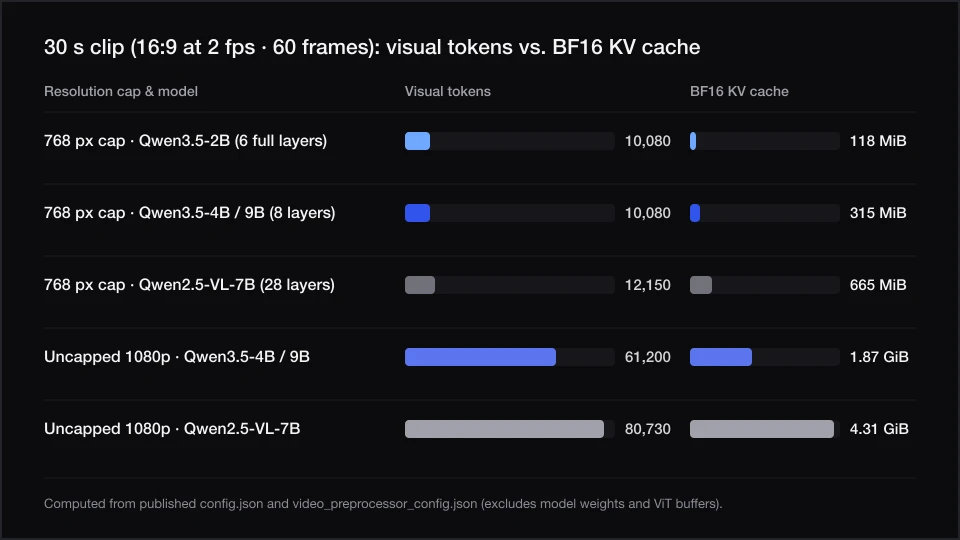
config.json and video_preprocessor_config.json.To shrink the RAM footprint of full-attention layers on long sequences even further, explore KV cache quantization on Apple Silicon.
3. Five verified Qwen3.5 MLX models vs. a pure-attention VLM baseline
The table below combines exact 4-bit MLX weight sizes from Hugging Face manifests with visual token and BF16 KV cache budgets calculated from each checkpoint’s published configuration for a 30-second clip at 2 fps and 768 px longest side:
| Model Checkpoint | 4-bit Safetensors Size | Attention Stack | Visual Tokens (30 s @ 2 fps) | BF16 KV Cache (768 px) | Apple Silicon Target |
|---|---|---|---|---|---|
| Qwen3.5-2B (4-bit MLX) | 1.60 GiB (1,642 MiB) | 24 layers (18 linear + 6 full · 12 KiB/tok) | 10,080 (336/pair) | 118.1 MiB | 8 GB iPhone / 8 GB iPad |
| Qwen3.5-4B-4bit (MLX) | 2.83 GiB (2,894 MiB) | 32 layers (24 linear + 8 full · 32 KiB/tok) | 10,080 (336/pair) | 315.0 MiB | 16 GB+ Mac / 16 GB iPad (tight on 8 GB iOS) |
| Qwen3.5-9B (4-bit MLX) | 5.54 GiB (5,675 MiB) | 32 layers (24 linear + 8 full · 32 KiB/tok) | 10,080 (336/pair) | 315.0 MiB | 16 GB Mac (short chats) / 24 GB+ Mac |
| Qwen3.5-35B-A3B (4-bit MLX) | 18.99 GiB (19,447 MiB) | 40 layers MoE (30 linear + 10 full · 20 KiB/tok) | 10,080 (336/pair) | 196.9 MiB | 32 GB+ Mac (256 experts, 8 active) |
| Qwen2.5-VL-7B-Instruct | ~4.1–4.5 GiB (4-bit equiv.) | 28 layers (28 full · 56 KiB/tok · 14 px patch) | 12,150 (405/pair) | 664.5 MiB | 16 GB+ Mac (higher prefill and KV cost) |
Remember that KV cache is additive on top of weights, recurrent linear-attention states, ViT activation buffers, and macOS or iOS system memory. On an 8 GB iPhone, iOS enforces strict jetsam termination with no swap file (~2.8–3.3 GiB usable by an app), so compact models like Qwen3.5-0.8B 4-bit (596 MiB weights) or Qwen3.5-2B 4-bit (1.60 GiB weights) leave crucial headroom for video prefill—whereas Qwen3.5-4B 4-bit already consumes 2.83 GiB in weights alone before decoding a single frame.
To add model weights, KV cache, and OS headroom for your exact Mac, iPad, or iPhone tier, see how much RAM a local LLM needs.
4. What frame sampling captures—and why it misses audio and sub-second cuts
Because the video pipeline passes sampled visual frames rather than an audio waveform, local VLM video analysis has clear physical boundaries that determine which tasks work reliably:
- No audio or speech understanding: Sampling frames at 2 fps sends only JPEG/pixel frames and timestamps. A VLM cannot hear spoken instructions, background music, or off-camera narration unless text appears on screen as captions or slides. For spoken recordings, transcribe the audio locally with speech recognition first and combine the transcript with visual questions.
- Sub-0.5-second events can fall between samples: At 2 fps, frames sit 0.5 seconds apart. Fast handoffs, brief error toasts, or single-frame flashes may land between sampled timestamps. If a moment is critical, trim the clip tightly or take a still screenshot of that exact frame.
- Small UI text needs framing over raw frame count: Scaling a wide 4K desktop recording down to 768 px on the longest side compresses 11-point body text below legible patch boundaries. Crop or zoom screen recordings to the relevant window before asking the model to transcribe numbers or labels.
- Runtime compatibility matters: On Apple Silicon, native frameworks such as MLX Swift LM and MLX-VLM (also documented in server engines like the vLLM Qwen3.5 guide) require both a vision-capable checkpoint and a matching multimodal video processor. A model that supports still photos does not automatically accept video inputs.
To see what else shipped alongside local video questions, read the Lapis 3.3 announcement with video and Apple documents.
5. How to test local video accuracy and memory on your own Mac or iPhone
Because decoding latency and memory pressure depend on your chip’s memory bandwidth, thermal state, and clip complexity, run this quick three-step check before relying on local video analysis for real work:
- Test action ordering with a 10–15 second silent demo: Record a short screen clip or physical process with two or three visible state changes, ask for a chronological list with approximate timestamps, and verify whether the model gets the sequence right without inventing unseen steps.
- Test small text vs. broad motion: Record a slide or app window at 768 px scale and ask for one exact number on screen. If the model misreads digits, crop closer rather than increasing clip length.
- Check audio separation intentionally: Ask what someone says in a clip that has no subtitles or visible mouth/text cues. A reliable prompt setup should report that audio is unavailable rather than guessing dialogue.
To try this workflow without code on your own device, follow our step-by-step guide on how to ask questions about a video in Lapis.
6. How to ask about videos locally in Lapis
Lapis 3.3 on the App Store brings local video questions directly to iPhone, iPad, and Mac using compatible on-device Qwen3.5 vision models—no Python environment, terminal setup, or cloud upload required:
- Bounded on-device sampling built in: Select a downloaded Qwen3.5 vision model from the Lapis device-aware catalog, tap +, and choose Video. Lapis decodes unprotected MOV or MP4 clips (up to 30 seconds and 250 MB) locally using Apple’s decoders at 2 visual frames per second and up to 768 px on the longest side.
- Clear memory and modality boundaries: If a selected model does not support video (or if a clip exceeds your device’s working memory budget), Lapis reports the limit explicitly instead of silently dropping frames. As with all visual-only frame pipelines, Lapis does not transcribe audio—keep questions grounded in what is visible and verify important details against the original clip.
- Run on the device with the RAM you need: Use compact Qwen3.5 checkpoints (0.8B or 2B 4-bit) on 8 GB iPhones and iPads, or run 4B, 9B, and 35B-A3B 4-bit directly on Mac. Note that Lapis Link transfers encrypted text only and does not forward photos or video attachments, so video questions run locally on the device where the model and clip live.
Check which multimodal models and visual workflows your device supports in Lapis vision and document features.
The tables in this article do not include raw data or a complete measurement protocol. Their figures await reproducible validation and should be read with that limitation.
Sources and references
- Qwen3.5 Official Release Overview (Native Multimodality and Hybrid Linear Attention)
Qwen Team, Alibaba Group
- Qwen3.5-4B Model Card, config.json, and video_preprocessor_config.json
Qwen Team (Hugging Face)
- Qwen3.5-2B Model Card and Configuration (config.json)
Qwen Team (Hugging Face)
- Qwen3.5-9B Model Card and Configuration (config.json)
Qwen Team (Hugging Face)
- Qwen3.5-35B-A3B Mixture-of-Experts Model Card and Configuration
Qwen Team (Hugging Face)
- mlx-community/Qwen3.5-4B-4bit MLX Quantized Checkpoint
MLX Community (Hugging Face)
- Qwen2.5-VL-7B-Instruct Model Card and Full-Attention Configuration
Qwen Team (Hugging Face)
- Qwen2.5-VL Technical Report (Dynamic Resolution and Multimodal RoPE)
Shuai Bai, Keqin Chen, Xuejing Liu, et al. (arXiv:2502.13923)
- MLX Swift LM: Language and Vision-Language Models on Apple Silicon
Apple Machine Learning Research (GitHub: ml-explore/mlx-swift-lm)
- MLX-VLM: Vision-Language and Video Inference on Apple Silicon
MLX-VLM Maintainers (GitHub: Neywa-Labs/mlx-vlm)
- vLLM Qwen3.5 Usage and Deployment Recipe
vLLM Project Documentation
- Lapis — Official App Store Listing (Version 3.3)
Apple App Store
Local execution with Lapis
Chat with compatible models on iPhone, iPad and Mac. Download them once and use local inference offline; model size depends on your device’s resources.